Made in UAE · HVAC Heat Load Calculator

UAE heat load calculations in minutes, not hours

Pick the emirate, add your rooms, and get room-by-room cooling loads, plant size in kW and TR, and a printable report. NOVAC uses the ASHRAE heat balance method and checks every input against UAE building codes.

  • Runs in your browser
  • Free, no sign-up
  • Projects stay on your computer
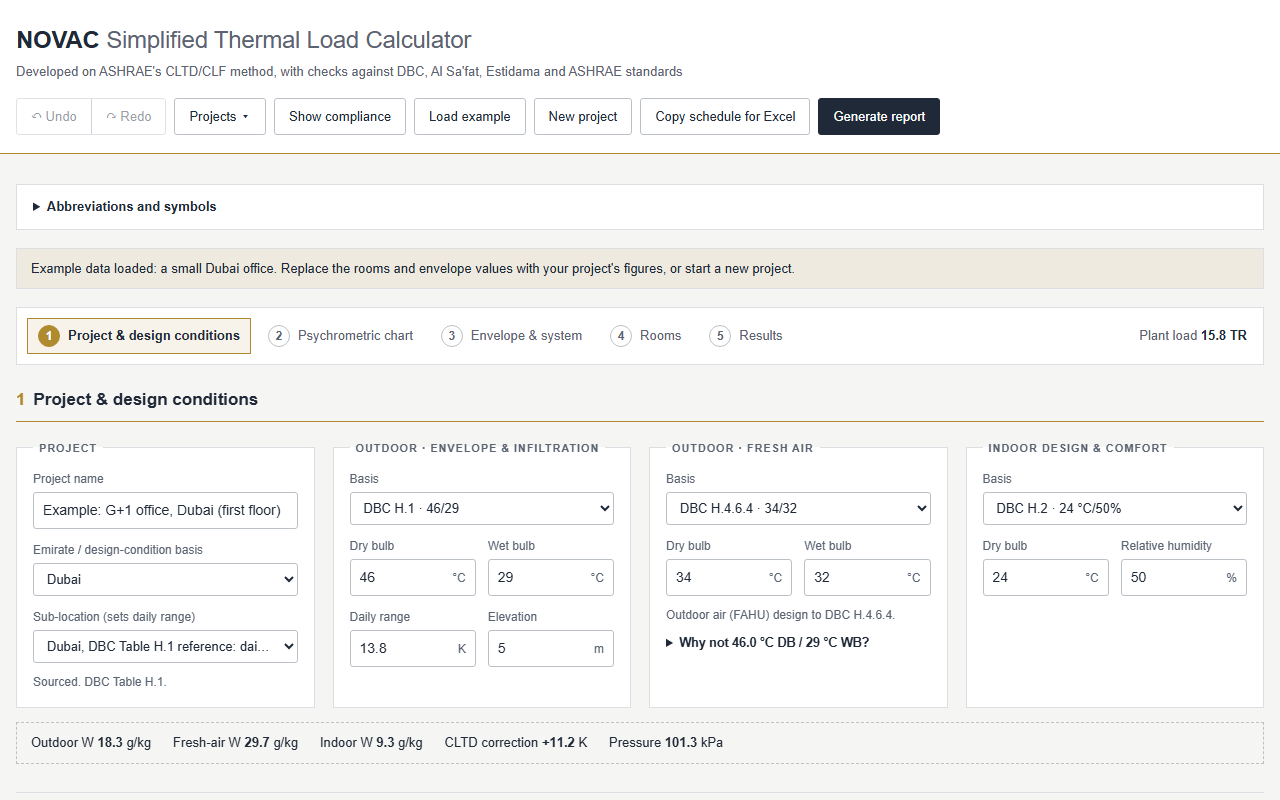
The NOVAC Heat Load Calculator with the example Dubai office loaded, on the project and design conditions step
Plant load13.8 TR
Outdoor design · DBC H.146 / 29 °C
8,760 hHeat balance, every hour of the year
99.85 %Calculation accuracy, verified
7 emiratesDesign conditions and sub-locations built in
5 code setsDBC, ASHRAE, Al Sa'fat, Estidama, Barjeel

Minutes, not hours

The slow parts of a load calc, done for you

Design conditions

UsuallyLook up the DBC, ASHRAE, Al Sa'fat or Abu Dhabi DoE Cooling Load Manual 2026 tables, then correct for elevation and daily range

With NOVACPick the emirate and sub-location. Outdoor, fresh-air and indoor conditions fill in.

Code checks

UsuallyCompare U-values and glazing with the code limits by hand

With NOVACEnvelope inputs are checked against the selected code as you type.

Typical floors

UsuallyRe-enter the same rooms for every repeated floor

With NOVACSet a floor once and repeat it; the building total updates live.

Plant and power

UsuallyConvert to TR, apply ESMA ratings and work out electrical power separately

With NOVACPlant load in kW and TR, nominal and actual efficiency, and power required, together.

The report

UsuallyCopy figures into a spreadsheet and format a submission

With NOVACA printable PDF report and a CSV load schedule from the summary step.

Why NOVAC

Built for UAE projects, without the desktop-software overhead

Made for the UAE climate

Design conditions for every emirate from the Dubai Building Code, ASHRAE standards, Al Sa'fat green building codes and the Abu Dhabi DoE Cooling Load Manual 2026, with sub-locations from the coast to the inland desert and Hatta that set elevation and daily range. Fresh air is designed to DBC 34 °C DB / 32 °C WB, or the Abu Dhabi DoE Cooling Load Manual 2026 condition.

UAE codes and ESMA built in

Dubai Building Code and ASHRAE 90.1-2025 limits checked input by input, with Al Sa'fat, Estidama and Barjeel alongside. ESMA star ratings at T3 46 °C are converted to the 35 °C nominal rating, so equipment efficiency is compared like for like.

Heat balance, independently verified

The ASHRAE heat balance method, hour by hour for every month, with walls and roofs modelled layer by layer. Checked against an independent time-stepping simulation, it agrees within 0.15 % at every hour.

Nothing to install

Runs in any browser on Windows, Mac or a tablet. No licence key, no admin rights, no sign-up, and your projects stay on your own computer.

Results you can explain

Every room peak is split into walls, roof, glass, people, lighting, equipment, infiltration and fresh air, and the parts add up exactly, with the hour each room peaks.

Minutes, not hours

A guided five-step workflow from project brief to plant size, opening on a worked example. Loads update as you type, so there is no run button and no weeks of training.

Workflow

Five steps from project brief to plant size

  1. Project detailsName the project, client, consultant and contractor for the report.
  2. Design conditionsPick the emirate and sub-location; the codes fill in the conditions, shown on the psychrometric chart.
  3. Building envelopeU-values, glazing, wall types and the fresh-air system, once for the whole project.
  4. SpacesRooms on floors with typical-floor repeats, a live building stack and floor plans coloured by load density.
  5. Heat load summaryRoom, fresh-air and plant loads in kW and TR, efficiency, power required and the report.

Methodology

How the heat balance method works

NOVAC follows the ASHRAE heat balance method (Fundamentals, Ch. 18). Rather than looking up tabulated factors, it balances the heat flowing through every surface and the room air, hour by hour.

  1. Outside surface balanceEach wall, roof and window takes in sun and gains or loses heat to outdoor air, the sky and the ground. The outdoor conditions are the design day for the 21st of each month.
  2. Conduction through the layersHeat moves through each layer of the build-up, with its own conductivity and thermal mass. That mass delays and softens the afternoon peak.
  3. Inside surface balanceEach inside face exchanges long-wave radiation with the other surfaces and absorbs sunlight through the glass and radiant heat from people, lights and equipment.
  4. Room air balanceThe cooling load is the convection from every surface, plus the convective part of the internal gains, plus infiltration.

A repeating design day

Each design day is solved in its settled, repeating state, with no warm-up error. This gives the same result as running hourly balances until one day matches the next.

Peak hour and month

All 24 hours of all 12 months are calculated for every room. NOVAC reports each room at its own peak and the building at its coincident peak.

Components that add up

The model is linear, so the peak splits exactly into walls, roof, glass, people, lighting, equipment and infiltration. Fresh air and margins are then added for plant sizing.

Features

Everything a cooling load calculation needs, in one workspace

Room-by-room loads

Sensible and latent loads from walls, roof, glass, people, lighting, equipment and ventilation for every room, with project totals in kW and TR.

Floors and building views

Group rooms by floor, repeat typical floors, and drag spaces between them. A building stack and schematic plans show where the load sits.

Efficiency and power

Pick the cooling system and FAHU arrangement; see actual and nominal efficiency, capacity and electrical power for room, fresh-air or total load.

Psychrometrics and comfort

A psychrometric chart of every design state, supply-air checks, and PMV/PPD comfort figures for the indoor design.

Reports and exports

A printable calculation report as PDF, the load schedule as CSV, or the whole report copied into Word or email.

Save, undo and redo

Save to a project file on your computer and keep saving with Ctrl+S, or keep copies in the browser. Try a different glass or occupancy and step back with Ctrl+Z.

NOVAC Pro

Beyond the peak load: analysis and system design

Pro takes your heat load project further, from annual energy to system design. Pro is locked for now.

Included in Pro

Hourly analysis Locked Coming soon

Heat balance loads hour by hour and month by month, by component. Run a full year of real weather from Open-Meteo or NASA POWER for annual energy, extremes and climate charts, with EPW export.

Indoor air quality Locked Coming soon

The ASHRAE 62.1 ventilation rate procedure applied to your rooms, an hourly contaminant balance with outdoor air quality, and filter selection.

Energy audits Coming soon

Compare an existing building's metered energy with its calculated loads and find where savings sit.

Energy modelling Coming soon

Whole-building annual energy simulation, building on the heat balance engine.

Pro add-ons

Tools that take your heat load results through to system design, submissions and your team. Add the ones you need.

Air side

Duct sizing Available now

Supply ducts sized by equal friction or velocity, with fittings, the worst branch and fan external static pressure (ASHRAE Ch. 21), and every space checked against ASHRAE acoustic velocity limits. Use it with your heat load project or on its own.

Open the duct sizer

Equipment schedules Coming soon

FCU, AHU and FAHU selections from your room loads and airflows, and VRF outdoor units corrected for pipe length.

Kitchen ventilation Coming soon

Hood extract and make-up airflows, and the kitchen and building pressure balance, to DBC H.4.12.15.

Life safety

Car park ventilation Coming soon

CO control, jet fans and smoke clearance to DBC H.4.12.11.

Staircase pressurisation Coming soon

Supply airflow to keep protected stairs and lobbies free of smoke: leakage through closed doors, airflow through open doors and pressure relief, to UAE Fire and Life Safety Code Ch. 10.

Water side

Chiller selection Coming soon

Number and size of chillers from the plant load, part-load efficiency to ESMA and ASHRAE 90.1, and chilled-water flow.

Pipes and pumps Coming soon

Pipe sizes, velocity and pressure drop through the building, and the pump head for the index circuit.

District cooling Coming soon

Pipework from the energy transfer station to each riser and terminal unit, checked against the provider's ΔT.

Thermal storage Coming soon

Storage size to shift the peak load, for district cooling tariffs and smaller plant.

Compliance and cost

Green building Coming soon

Al Sa'fat, Estidama and Barjeel documents built from the code checks NOVAC already runs.

Condensate recovery Coming soon

Recoverable condensate from the latent load, for buildings above 350 kW (DBC H.5.2.4).

Life-cycle cost Coming soon

Compare district cooling with on-site chillers, or ESMA star ratings, over the life of the plant.

For firms

Branded reports Coming soon

Your company logo and details on every calculation report.

Cloud projects Coming soon

Projects saved online and opened from any computer.

Team sharing Coming soon

Share projects with colleagues and review each other's calculations.

Compare

How NOVAC compares with desktop load software

Desktop load softwareNOVAC
Getting startedInstall on Windows, then activate a licenceOpen a browser
CostPaid licence or annual subscriptionFree
Time to first resultHours, and training usually neededMinutes, with guided steps
UAE design conditionsEntered by the engineerBuilt in, by emirate and sub-location
DBC, ASHRAE, Al Sa'fat, Estidama, Barjeel checksChecked by handChecked on every input
ESMA efficiency ratingsNot includedBuilt in, T3 converted to 35 °C
Load methodHeat balance or transfer function, by productASHRAE heat balance, verified

Standards

Checked against the codes you design to

  • Dubai Building Code 2021
  • ASHRAE 90.1-2025
  • ASHRAE 62.1-2025
  • ASHRAE Fundamentals 2025 heat balance
  • Al Sa'fat 2023
  • Estidama PBRS v1.0
  • Abu Dhabi DoE Cooling Load Manual 2026
  • Barjeel V1.3
  • ESMA UAE.S 5010:2019

Your projects stay on your computer. Nothing is uploaded; save them as files to share with colleagues.

Works like the desktop tools you know
CtrlS
Save project
CtrlShiftS
Save as
CtrlZ
Undo
CtrlY
Redo

FAQ

Common questions

Is NOVAC free?

Yes. NOVAC runs in your browser with no licence, no installation and no sign-up. Pro tools are locked for now.

How long does a heat load calculation take?

Minutes, not hours. Design conditions fill in from the emirate you pick, and room loads, plant size in kW and TR, and the report update as you type.

What calculation method does NOVAC use?

The ASHRAE heat balance method, hour by hour for every month, with walls and roofs modelled layer by layer. It agrees with an independent time-stepping simulation within 0.15 % at every hour.

Which UAE codes does NOVAC check?

Dubai Building Code, ASHRAE 90.1-2025 and 62.1-2025, Al Sa'fat, Estidama and Barjeel envelope limits, the Abu Dhabi DoE Cooling Load Manual 2026, and ESMA UAE.S 5010 efficiency ratings.

Where are my projects stored?

On your own computer. Nothing is uploaded; save projects as files to share them with colleagues.

Can NOVAC replace full energy modelling?

Not yet. NOVAC sizes peak cooling loads and plant, and energy modelling is coming to NOVAC Pro. For ASHRAE 90.1 Appendix G or LEED energy models, use a full building simulation tool.

Changelog

What's new

Size your next project in minutes

Open NOVAC with a worked example, or start a new project.

Start a calculation